How to Capture and Record Your Screen with Computer Audio on Mac OSX

Update 2012/12/24: After a year, it looks like people are still finding this blog post. I personally had a lot of trouble using QuickTime after upgrading to Mountain Lion where my computer would become super slow whenever I tried to screen capture with it. Instead I have found a new piece of wonderful software called Voila (was provided an affiliate link to use from Global Delight). It isn’t free unfortunately, but for $10, the amount of hassle you save is worth it. One of the feature that it includes is the ability to capture computer audio without using the SoundFlower trick below which is very convenient.
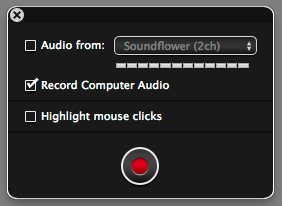
Voila Record Computer Audio

Original Post:

So I was looking for a software to capture my computer screen on Mac OSX and was surprised that the newest QuickTime (version 10) comes with a screen recording feature. It can record both your entire screen or or just a selected area, thought there appears to be a minimum height/width it requires.

It encodes the video in H.264 and audio in AAC, both which are excellent and widely supported codecs. I’m not sure if these are changeable or configurable, but worse case you can easily re-encode it afterwards.

One caveat of using QuickTime (or just about any screen recording software) is that there isn’t a easy way to record the computer audio. Some soundcards come with drivers that has an input that is the computer audio output, but Mac by default doesn’t. QuickTime will allow you to record from line-in, so if wanted, you can purchase a short 3.5mm mini-stereo cable and connect your audio output to audio input.

I did a little search online and found an interesting software called Soundflower by Cycling 74 and basically what it does is that it loops the audio back into the computer as an input, allowing QuickTime and any other software to record the computer audio.

Instructions for enabling Sunflower (computer audio):

  1. Install Soundflower. You can download the latest version from code.google.com (Soundflower homepage)
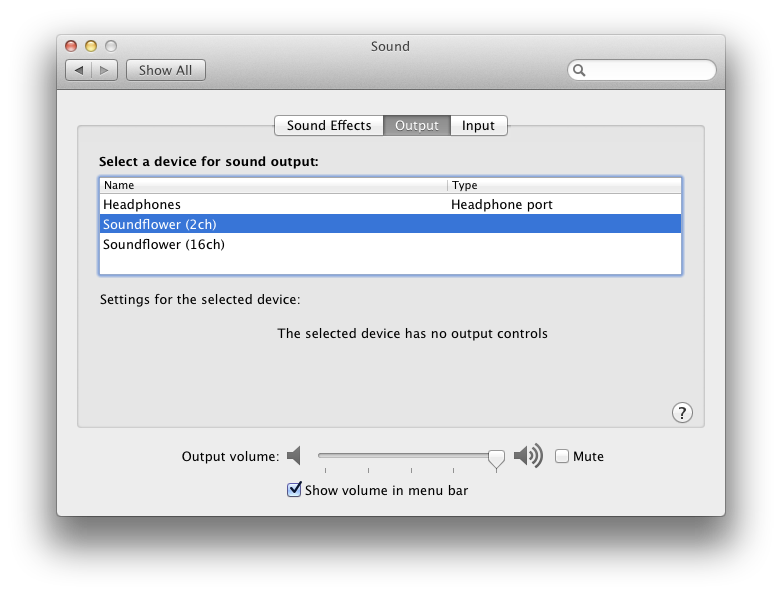
  2. Go to System Preferences > Sound and see if the new outputs exist: Soundflower (2ch) and Soundflower (16ch). If not, you may need to restart your computer.
    sound preferences with soundflower
  3. Select Soundflower (2ch) as your output. 2 channels/stereo should be sufficient in most scenarios, but feel free to use the 16 channels one.
  4. Audio should have stopped coming out of your speakers/headphones. In the event you still want audio to come out of your speakers, Soundflower comes with a solution. Launch Soundflowerbed from your Applications folder.
  5. You should find a new flower icon in your status icon area in the upper right hand corner.
  6. Click on the flower icon and select Built-in Output under Soundflower (2ch). Audio should began coming out of your speakers once again.
Instructions for recording your computer screen:

  1. Open QuickTime
  2. Click on File > New Screen Recording
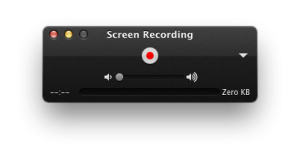
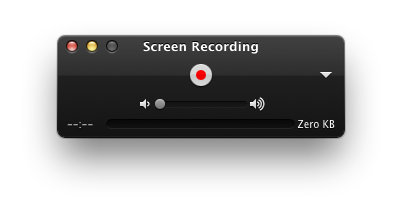
  3. You should see the following screen:
    QuickTime - New Screen Recording
  4. On the right hand side, you should see a little arrow pointing down. Click on it.
  5. Under Microphone, you should now see Soundflower (2ch) as an option. Select that.
  6. Click on the red dot and you will be able to select the area you want to record by dragging a box around the area.
  7. If you want to record the whole screen, just click anywhere on the screen.
That’s it!

After you’re done recording, I would highly recommend that you switch back your sound output to the Built-in Output. I’ve noticed a degradation of sound quality between the two.
Twitter Weekly Updates for 2011-09-25

How to Change the Default Alert Time for Birthdays on iCal for Mac OSX Lion

When I switched over to iCal from Outlook, I was happy to find that they also had a birthday calendar. However the alert time was defaulting to 8:00 am and I like my reminders going off at 12:00 am. I tried looking for a setting to change it, but there wasn’t anything obvious inside preferences. The only option was to enable or disable “Show Birthdays calendar”.

After looking around a bit more, I noticed I had my Day starts at set to 8am, which felt too much to be a coincidence. I changed the starting time to Midnight, but my birthdays’ alert time didn’t get updated. I wondered if it would only apply to new birthdays that get added.

Then I tried disabling and re-enabling to show birthdays and that updated all my birthday reminders to have an alert time of 12am. Sweet!

TL;DR:

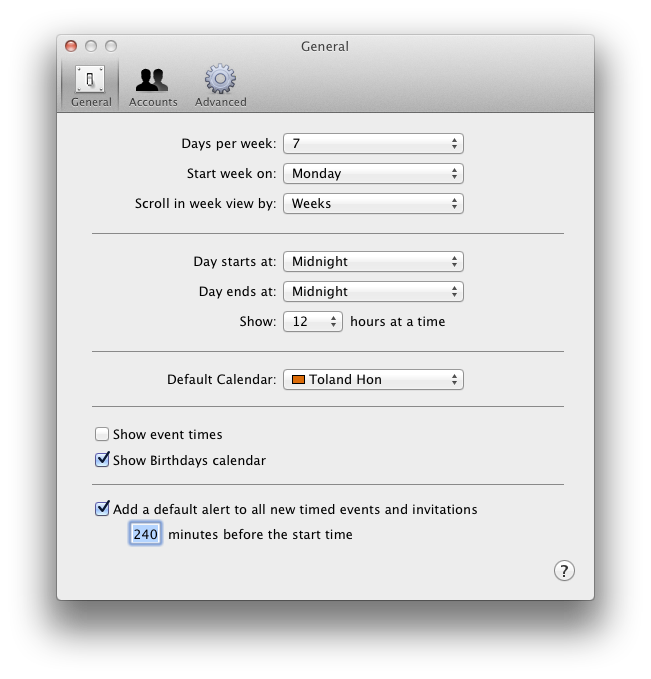
  1. Open iCal and go to preferences (⌘+,)
  2. Change “Day starts at:” to time you want your birthday alerts to go off
  3. Uncheck and recheck “Show Birthdays calendar”

iCal Preferences

All your birthday reminders should now have the new alert time. 🙂

Technically at this point, you might be able to change your day start time back and it wouldn’t affect your existing birthday alert times, but you’ll have to test that yourself.

Twitter Weekly Updates for 2011-09-18

  • @cut_the_rope @zeptolab When are the Om Nom plushies coming it? It's September already! 😀 #
  • I wonder if anyone's created an anti-tower defense game where you have a limited amount of money to create an army to take down a tower. #
  • For those who've seen Community S2, who's Kevin? And why did George Takei make him a voicemail? #
  • @ericborz That game actually looks really good! in reply to ericborz #
  • I had expected Steins;Gate to end after episode 22 and be a pretty good anime, but it's going to end at episode 24 and be an amazing anime! #
  • !@#$%^& http://t.co/fNSc7Usr What's that opening/background melody. I swear I've heard it in some animation before. #
  • @krunk4ever Finally popped into my head. It was the robot meeting the lighthouse! http://t.co/tpHLcFv9 in reply to krunk4ever #
  • Some really cute shirts for this week's Woot selection: http://t.co/22VJD5gn #
  • @majornelson @angelgrrl813 The question now is can I adequately play this game with a magic trackpad and no mouse. ;p in reply to majornelson #
  • Did you know that draft in British is draught?!?! #
  • I finally reached the episode that started it all, the Christmas stop motion special of Community S2. #
  • @shawboy78 Not sure if you knew, but Microsoft Office for Mac comes with the remote desktop client. in reply to shawboy78 #
  • @shawboy78 Haha. Gotcha 😉 in reply to shawboy78 #
  • Booo! Summer is officially over. Rain, rain, go away. Come back some other day. #
  • @lroseriver Someone also told me jail is spelt gaol. I hear that word is used in fantasy books a lot too. in reply to lroseriver #
  • @ryandjohnson @angelgrrl813 the roomba cat shirt is on sale today. 🙂 in reply to ryandjohnson #

Twitter Weekly Updates for 2011-09-11

Twitter Weekly Updates for 2011-09-04

  • Transferring 20GB over WiFi is not fun… Might be faster to move photos back onto SD card and the onto file server. #
  • The best advertising is one you're not sure you're being advertised to: http://t.co/jS2w6iP #
  • @jscott Ugh? How did it happen? Hope you're alright! in reply to jscott #
  • How to use the native screen sharing Mac OSX app to connect to VNC servers over the internet: http://t.co/ehaNW8V Awesome! #
  • @lroseriver Haha! Isn't it ironic you wrote a blog entry about how you don't want to write? ;p in reply to lroseriver #
  • Haha! Whatever happened to the guy from Blue's Clues: http://t.co/XbbPm4S #
  • @hjo3 Clickity-Clackity! in reply to hjo3 #
  • Nightlights: kid's forcefield against monsters at night. #