How to Change the Default Alert Time for Birthdays on iCal for Mac OSX Lion

When I switched over to iCal from Outlook, I was happy to find that they also had a birthday calendar. However the alert time was defaulting to 8:00 am and I like my reminders going off at 12:00 am. I tried looking for a setting to change it, but there wasn’t anything obvious inside preferences. The only option was to enable or disable “Show Birthdays calendar”.

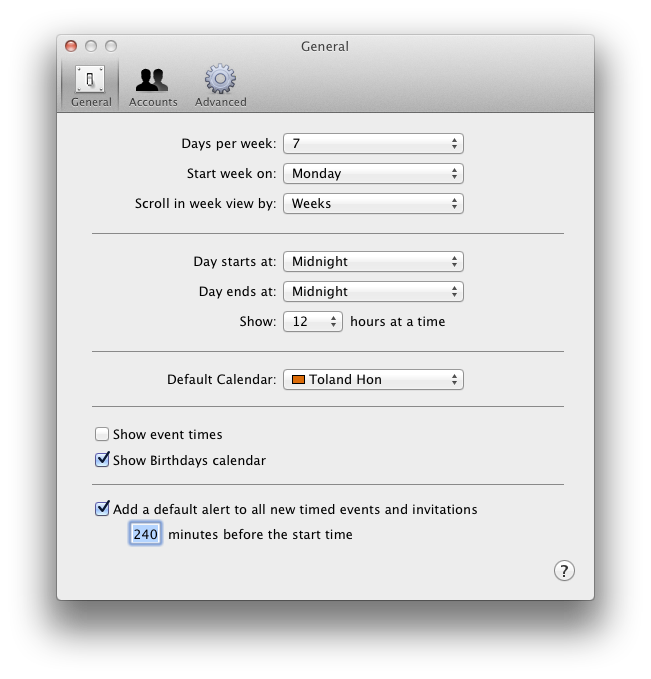
After looking around a bit more, I noticed I had my Day starts at set to 8am, which felt too much to be a coincidence. I changed the starting time to Midnight, but my birthdays’ alert time didn’t get updated. I wondered if it would only apply to new birthdays that get added.

Then I tried disabling and re-enabling to show birthdays and that updated all my birthday reminders to have an alert time of 12am. Sweet!

TL;DR:

  1. Open iCal and go to preferences (⌘+,)
  2. Change “Day starts at:” to time you want your birthday alerts to go off
  3. Uncheck and recheck “Show Birthdays calendar”

iCal Preferences

All your birthday reminders should now have the new alert time. 🙂

Technically at this point, you might be able to change your day start time back and it wouldn’t affect your existing birthday alert times, but you’ll have to test that yourself.

Side by Side Browsing

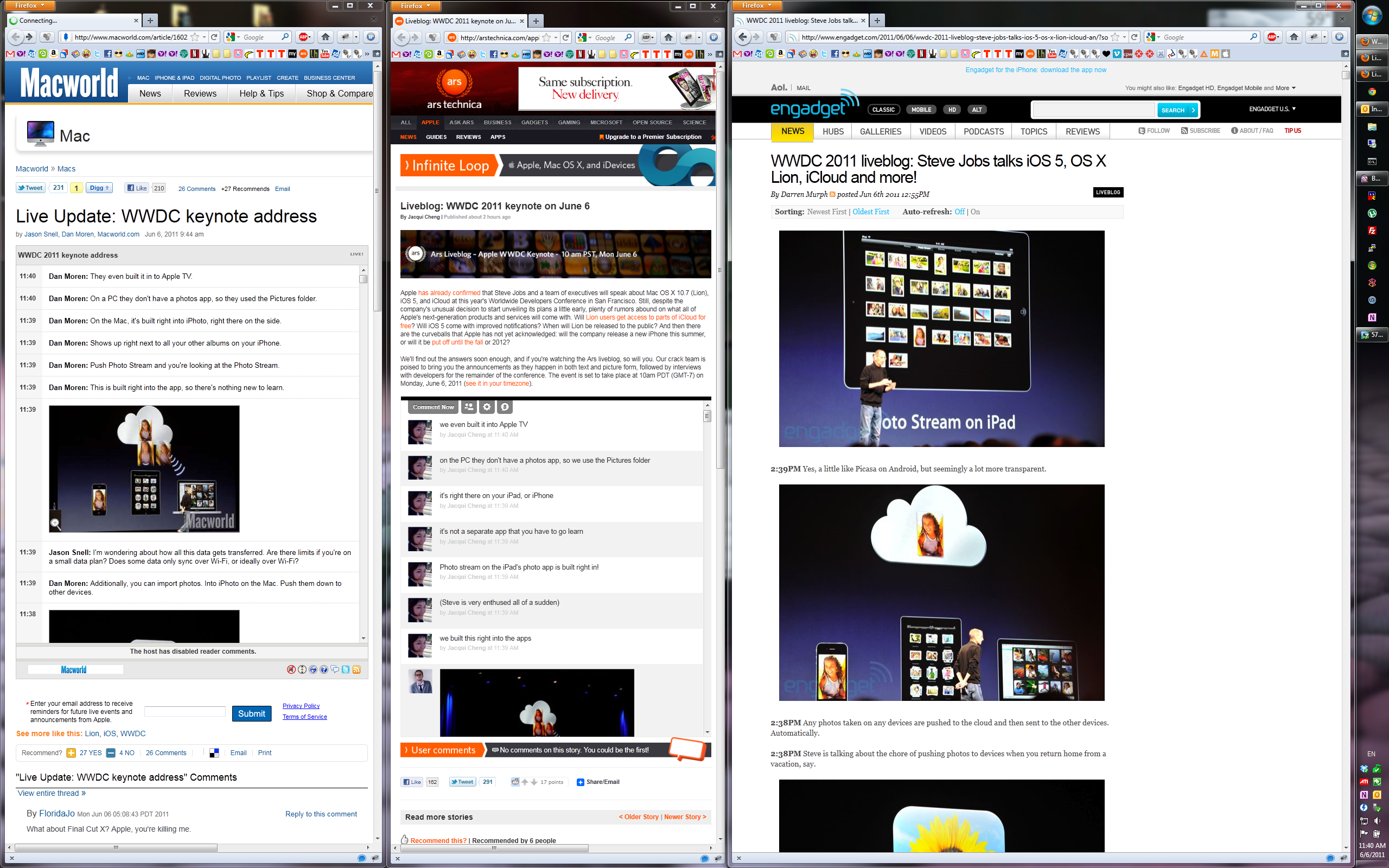
Just a random thought, but browsers should have side by side browsing.

Maybe it’s just me, but how often do you open 2 separate browser windows so you can look at 2 separate pages simultaneously. With our giant screens these days, it’s often a waste of screen estate just to have the browser take up the whole screen, given that most websites are better viewed in portrait mode. These days, I usually just snap my browser to the left or right side.

I think web searches are the best argument for my feature request.

When I do a web search and don’t see what I’m looking for immediately (e.g. sample code on how to do something), I open a few of the results in new tabs and then go through them. If I don’t find what I want, I go back to the results and open a few more.

Imagine instead of opening all the results in a new tab or always hitting back to get back to the search results, clicking on a search result would snap the search results to the left of the browser, and open a new browser view on the right. Therefore, you can quickly go onto the next search result without having to switch taps or go back to the previous page.

I’m not sure if both the left/right browser views should be of the same size. Having both views have the same size works great for comparing 2 pages, but having one as a side bar (e.g. Firefox’s bookmark/history or the new Windows 8 side by side mode), wouldn’t be bad either. Or maybe let the user decide and be able to change the widths on the spot.

Other features that would be neat if it came along with this:

  • If I clicked on a link and it pointed to a different domain, the side by side feature would automatically kick in.
  • Have a new target (e.g. _side) that people can add to their html, like what they have done for _blank, _top, etc.
  • History should remember the side by side views.
  • We can even designate a mouse/keyboard command to open the link as a side view. (e.g. opening in a new tab can currently be triggered by middle click or CTRL+left click)
  • There should also be a easy way to quickly switch which view is on which side, especially if one view is much wider than the other.

Just another random thought I had that would be cool if it came to existence.

Wireless Peripherals with USB Connection

Just a random rant.

I wonder why manufacturers don’t include a USB cable/connection on wireless peripherals (e.g. keyboards and mice). This is probably already out there in the market, just not in any peripherals that are any good. I know it’s probably counter-intuitive to think wireless peripherals with a wired USB connection, but have you ever had to setup a new computer with wireless peripherals or had your computer forget how to talk to your wireless peripherals? Do you recall having to find an existing wired keyboard and mouse or pull one from a working computer to setup your wireless keyboard and mouse? Yeah, annoying right?

If they included a USB cable (which would be great if they could design that it’s hidden/retracted when not in use) or if they just include a mini-USB port so I can easily connect it with a USB cable, that’d be awesome!

One could argue that if you ever had to use a wired keyboard/mouse to setup your wireless peripherals, that the design is broken already and I would agree. But until the day where they can magically get wireless peripherals to talk to my computer, I still need to bust out my USB keyboard and mouse.

Signed up for Google Apps

I signed up my Krunk4Ever.com domain to use Google Apps. Hit a couple bumps along the way. Apparently my site had been previously registered for Google Apps. I don’t recall ever doing it, but my memory isn’t exactly great. In order to reset the account, I had to modify my DNS settings to verify that I own the domain. Turns out there wasn’t even an admin account setup for that Google Apps domain.

One of the reasons I was initially hesitant to sign up for Google Apps was because I had a catch-all account and I recall someone told me that Google Apps didn’t support catch-all. Either I misremembered or they added that feature later, but it appears they now support catch-all. The reason why the catch-all account is important is because I provide unique email addresses for most businesses I deal with. The instructions seem simple enough.

However, following those instructions landed me in a grayed out disabled forward address box. Turns out I’m not the only person who hit this issue: Why is the catchall forward address grayed out? I tried switching back to the current version (instead of the default of next generation) as suggested by some people, but that didn’t fix the issue.

Given on how much I rely on my catch-all, I was pretty upset this wasn’t working out and was even set on switching back. Then I found this thread: Can’t assign address to catch-all and the suggested workaround was to sign up for Google Apps for Business 30-day trial, which would make that field editable. After upgrading to Google Apps for Business, I was able to set the forwarding/routing address for my catch-all. Annoying that I had to do this to get it working when their help says that the free edition has this feature too.

Things seem to be working so far. I’m decided to continue using my GMail account as my default, so my old @krunk4ever.com email address will just be considered as part of the catch-all.

New Email Address

Due to unfortunate circumstances, I have decided to change email address. It appears my email address was leaked and it has been receiving a ton of spam recently. It’s also what prompted me to post Why is There No Universal Email Web Client? last week.

After a long deliberation, I decided to give GMail a try. The main reasons being:

  • Ability to import emails from different accounts
  • Ability to send emails as different accounts
  • Free POP3, IMAP, and ActiveSync support
  • Emails are kept forever
  • Great spam filter
  • Tons of space

I know the last 2 are given for most email services these days, but did you know that Yahoo! still charges if you want POP3?!?!

I never knew how much I would love that deleting emails == archiving emails. No longer do I need to manually move emails I want to keep into a specific folder. Just delete it and if I ever need to find it again, I just have to search for it.

I was initially hesitant to give up all my email to Google, like they don’t know enough about me already. But I decided for the convenience, it would be worth it. I also consider hosting my email server on GMail, but decided to hold off on that for now.

Moving my email over did take a bit of time as I’m guessing (drag and drop) IMAP to IMAP via Outlook isn’t exactly the most efficient. But I went from occupying less than 1% of my email space quota to You are currently using 1325 MB (17%) of your 7586 MB.

Emails to my old address will still work (albeit with a delay), as they’re automatically imported by GMail every so often. My new email address is basically the same as my old one, but instead of *@krunk4ever.com, it’s *@gmail.com.

Why is There No Universal Email Web Client?

Wow. It’s been over a month since my last blog post. And who would’ve thought possible, but I think I got sunburnt today. Really? My forearms are really red…

Today I wanted to rant about a technology that should’ve existed a long time ago, but I have not found any company that offers the product I want. Back before GMail made its debut, everyone was using Outlook or Eudora (I still remember servicing Eudora clients during my college job).

However, once GMail came out, that changed how people began to use email. Shortly after, Hotmail (now Live Mail) and Yahoo followed suit, with the convenient access and the high storage capacity. And for most people, that’s enough. Most people only have 1 personal email address and 1 work email address, and GMail and these other web email solutions work out great for them.

However, one of the main reasons people I think people have stuck with Outlook or Mail is the fact it can support multiple accounts. I have 4 or 5 different email accounts that I use on a regular basis and it’s extremely convenient to be able to access all of them in 1 simple application. I can search through ALL my emails, quickly glance to see which accounts have new emails, select which email account I want to send from, etc.

In today’s model, each email service has its on web client. If I didn’t have access to my computer or smart phone and wanted to check my email through a public terminal or a friend’s computer, I would have to sign in and out of each email account on their respective websites, which is a hassle.

Why hasn’t anyone made a email client web app that supports multiple email accounts. Outlook does have a web version called OWA (Outlook Web Access), but it only works for the exchange server that is backing it. I want to be able to provide an app with my email credentials and it would go and fetch all my email into 1 convenient location, where I can access from any computer in the world.

GMail does support fetching email from external accounts into your GMail account and they even have the ability to send as a different email address (once verified), but you lose the separation of accounts, which I find important.

Before I got my smart phone, the way I got around this was remoting back into my PC at home and using Outlook on that machine. I still do that today, but with my smart phone which also has access to all my email accounts, it’s has become less of an issue. Still I find myself composing emails through the remote session since typing emails that are more than a couple sentences long is such a pain on your smart phone.

Maybe one day, my wish will come true.

Getting Obihai OBi110 to work with Google Voice

So I had mentioned about the Obihai OBi110 in a previous blog post: Google Voice to Real Phone and Back! Now that Google is shutting down Gizmo5, it became that much more urgent for me to get this device to my parents, since they no longer have a land line and actually make and receive calls from their home phone. Apparently their alarm system also goes through the home phone line. Good to know.

Obihai OBi110

Anyway, when I last blogged about it, the item was out of stock at Amazon.com. About 2-3 weeks ago, Amazon changed the status from out of stock to shipping in 2-4 weeks. So I went ahead and ordered one for $85. It was much higher than the previous $50 price tag when I first read about it, but I figured due to demand, limited supply, and urgency, $85 was still worth it. A couple days later, it had dropped to $70, so I canceled my original order and repurchased them at the lower price.

Anyway, it turns out that Obihai’s Amazon reseller account got stock quicker than Amazon did. It was actually cheaper too! $50 shipped (fulfilled by Amazon / limit 4) and neither CA nor WA had sales tax!

Unfortunately at the time of posting, the OBi110 is out of stock via their reseller account. It’s still available via Amazon for $85, but I found out they also have an OBi100 which may actually be enough for most people.
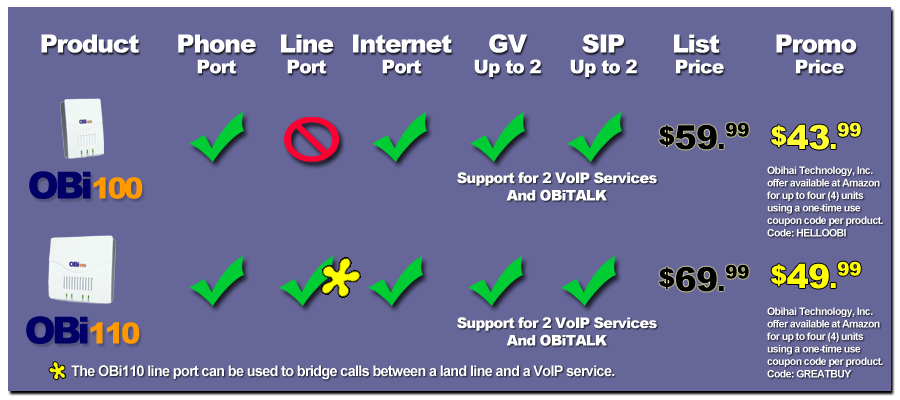
obi100 obi110 comparison

From the chart, it looks like the only difference is the Obi110 has an additional line port which allows you to do some neat stuff if you have an actual land line (e.g. calling from a phone outside your home and making calls through VoIP from your home internet connection). The Obi100 at the time of posting is available for $44 (after coupon / limit 4).

Review

So now that I’ve gone over the cost and the trouble I went through to purchase it, lets talk about the device, setting it up, and the experience I’ve had so far. I had my dad disconnect everything from the Linksys PAP2 and plug it into the Obihai OBi110 and it was immediately online. My dad kept on asking me what to do with the included telephone cable and ethernet cable and it took me 5 minutes to convince him that they were not needed since I’m reusing the cables from the existing ATA device. It was nice of them to include those cables though.

Different from most network devices, you do not connect to its ip address (e.g. http://192.168.0.x), but instead you create an account at obitalk.com. After verifying your email address, you click on Add Devices from the website and it’ll give you a sequence of #s to push on your phone that is connected to the device. Your device is now registered with your OBiTalk account. Simple enough.

After adding the device, it notified me that my firmware was out of date. To update the firmware, it was just another click from the website. I did have trouble with my initial attempt to upgrade the firmware, but when I tried to upgrade it again, it worked fine. This happened twice (once for my parents’ device and one for my own).

The device works with a series of service providers or your own custom SIP provider:

  • Broadvoice
  • Callcentric
  • Google Voice
  • InPhonex
  • Sipgate
  • Vitelity
  • VoicePulse
  • voip.ms

Each device supports 2 service providers, so technically you can have 2 Google Voice accounts ring the same phone. You can designate which account is in charge of making outgoing calls.

I was initially having problems setting up my parents’ Google Voice account. It turns out that he needed a GMail account since OBiTalk goes through Google Chat. After creating a GMail account and enabling calls to be forwarded to Google Chat, I was still having some issues. It finally got fixed after I deleted Google Chat (which was showing his old email) from his Google Voice account. After relaunching GMail, Google Chat got readded to Google Voice with his new GMail address and things started to work.

Update: Using the phone was pretty much straight forward (similar to a regular land line). You get to set up your default area code via their website, so if you enter 7 digits, it’ll assume that’s the area code you’re using. Otherwise, it’s 1-area_code-phone_number as usual. Voice quality felt a bit worse than when I was using my Linksys PAP2 in conjunction with Gizmo5, but it’s still way better than what you get with cell phones. There’s also this weird set of beeps (doo doo doo) when you initially pick up your handset to make a call, but afterwards, you get the the normal dial tone.

Another thing to note is that instead of plugging a phone into the OBi110, I have it connected to the house’s internal phone wiring, so that all the phones throughout the house can make and receive calls through the device.

As with Google Voice, all incoming calls are free and all outgoing calls to USA + Canada are free. International calls are also extremely cheap (rates).

Evolution of My Email Signature

Got back in touch with a co-worker when I was working at UC Berkeley’s tech support help desk and while going through past emails, I noticed that my email signatures was the same as the one I’m using today. That got me wondering when I started using it.

I still remember when I first joined Microsoft that apparently there was a thread on dsnuts asking what my signature meant. I never saw the thread myself, since I joined the alias much later.

Going through my email archive, I’ve found:

  • 10/2001: ~Toland
  • 08/2002: //Toland
  • 02/2003: //Toland ^_^x
  • 02/2003: //Toland (^_^x)

There’s been variations within the variations, but mostly the name being either krunk, my full name, or all in lower-case. I’m baffled that I’ve stuck with the current one for so long. I still remember why I went with //. I had seen an email from the dean of Berkeley or the college of engineering and he had signed his emails with /Robert. I thought, I want a / in my signature too. Somehow I ended up with //.

As for the smiley face, I’ve been using ^_^x for as long as I can remember. They’ve shown up in emails dating back to 2001 and I’m pretty sure I’ve used them in IM chats before then. But Feb 2003 was when I added the () parenthesis around it.

Taking Advantage of Facebook Friends List for Privacy Control

The first one is always the hardest. At first I was hesitant. I wasn’t really sure I wanted to do it. I was afraid since it was an undo-able action. There was no CTRL+Z. But once I started doing it, I got a certain high out of it. Then it became fun.

This post has been in my drafts since September 2010 and I’ve been meaning to post it, but I wasn’t sure if I wanted to post it publically on my blog. Then I started thinking what the purpose of the post was and decided it was merely for educational purposes.

That weekend in September, I broke 400 friends on Facebook. That got me thinking… I should probably really start cleaning up my friends list. De-friending someone seems like such cruel thing to do. Plus you also lose access to their information. But I eventually made the decision that removing friends was the correct option.

The first remove was definitely the hardest. My mouse pointer was hovering above the “Remove from Friends” link as I was hesitant to actually click it. Funny thing is after I clicked it, there was a confirm or cancel dialog making me ponder once again if I wanted to remove this specific person.

remove from friends button

After removing the first friend or two, I began to get a weird adrenaline rush and it began to feel fun removing friends. There were people I can’t even remember how I knew. Those were the easiest to get rid of. I’ve whittled my friends list down to 382. Not too impressive, I know.

However, I soon hit into the wall of friends who I remember, but never or hardly ever talk to. Would I ever talk to them again? Probably. Do I really care? Who knows. After pondering for a couple days, I decided to redo my entire Facebook privacy control. The nice thing about friends list is that other friends have no idea what lists they are on.

I already had a list for my “Inner Circle” and thought maybe I should create a list of friends to exclude from my regular postings. However, I soon realized that a white list was much better at what I wanted to do than a black list. I initially named the list “Outer Circle”, but ended up dropping the Outer prefix since they were still part of my circle, just not my inner circle. It’s a pity that Facebook doesn’t allow groups within groups, since if I want to add a friend to my “Inner Circle”, I also have to add them to my “Circle”.

I then went and change most of my defaults (e.g. wall, posts, comments, things I share, things others share, contact info, etc.) to my “circle” friends list. The only significant thing I gave broader access to was my photos which I typically share to friends of friends. People outside of my circle still have access to some contact info, where I work, and are able to message me.

I go through the list every couple months removing people I no longer talk to. My current “circle” list is at 168 friends, which is a much more manageable size than 400. I usually add new friends into the “circle” list, and if it turns out I don’t talk with them, they’ll get removed during my next cleaning.

Another nice thing is that even though all my posts default to my “circle” list, I can easily change it to all my friends or friends of friends by clicking on that security lock. This prevents me from actually posting something for the entire world to see, and if I screwed up the privacy settings, I can easily delete that post and post again with the correct privacy settings.

As I mentioned earlier, I was originally hesitant to make this post public. My guess if you’re reading my blog or actually see this post on my wall, you’re already part of my “circle” list. If you aren’t, feel free to give me a ping. (^_^x)