Obihai just sent out an email to all their users announcing that once again Google Voice is now officially supported on OBi VoIP devices.
Google had announced they were disabling XMPP support awhile back, causing Obihai and other VoIP device manufacturers who were piggybacking on Google Voice to scramble for a new free/cheap solution. XMPP access was suppose to be disabled back in May, but I don’t think Google has actually pulled the plug yet. Though that hasn’t stopped me from finding a new solution while we wait for the inevitable.
Yesterday, Google announced they’ve integrated Google Voice into Google Hangouts. Today, Obihai announces that they’re officially supporting Google Voice again. Not sure if that’s purely a coincidence or the integration has opened up some access point that Obihai can now connect to.
Setting up your Obihai device with Google Voice is simpler than before:
- Log into https://www.obitalk.com and go to your Dashboard
- Select your OBi device from the list
- Click on the new Google Voice Set-Up button above your service provider list
- If this is your first time setting up with new Google Voice, it should prompt you to update your firmware which should take 1-2 minutes
- Once the firmware update completes, enter your area code and link it up with your Google Voice account
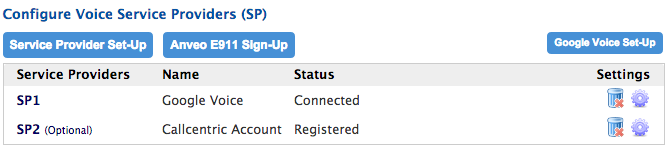
Tada! That’s it! You’re no longer require to provide OBiTalk with your Google credentials. Instead, they’ve adopted OAuth (similar to how you can use Facebook or Twitter to log into random websites).
 I generally try to be environmentally friendly, but I just can’t seem to remember to ever bring in my tote bag into the grocery store. Maybe it’s because it’s so infrequent that I ever go to a supermarket. I always have a tote bag in the back of my car, but 90% of the time, I only remember it when I’m checking out. By then, I’m too lazy to just drop everything just to retrieve my tote bag from my car.